Work with one policy across Overview, Premium, Ledger, Loans, Documents, and Analytics
On this page
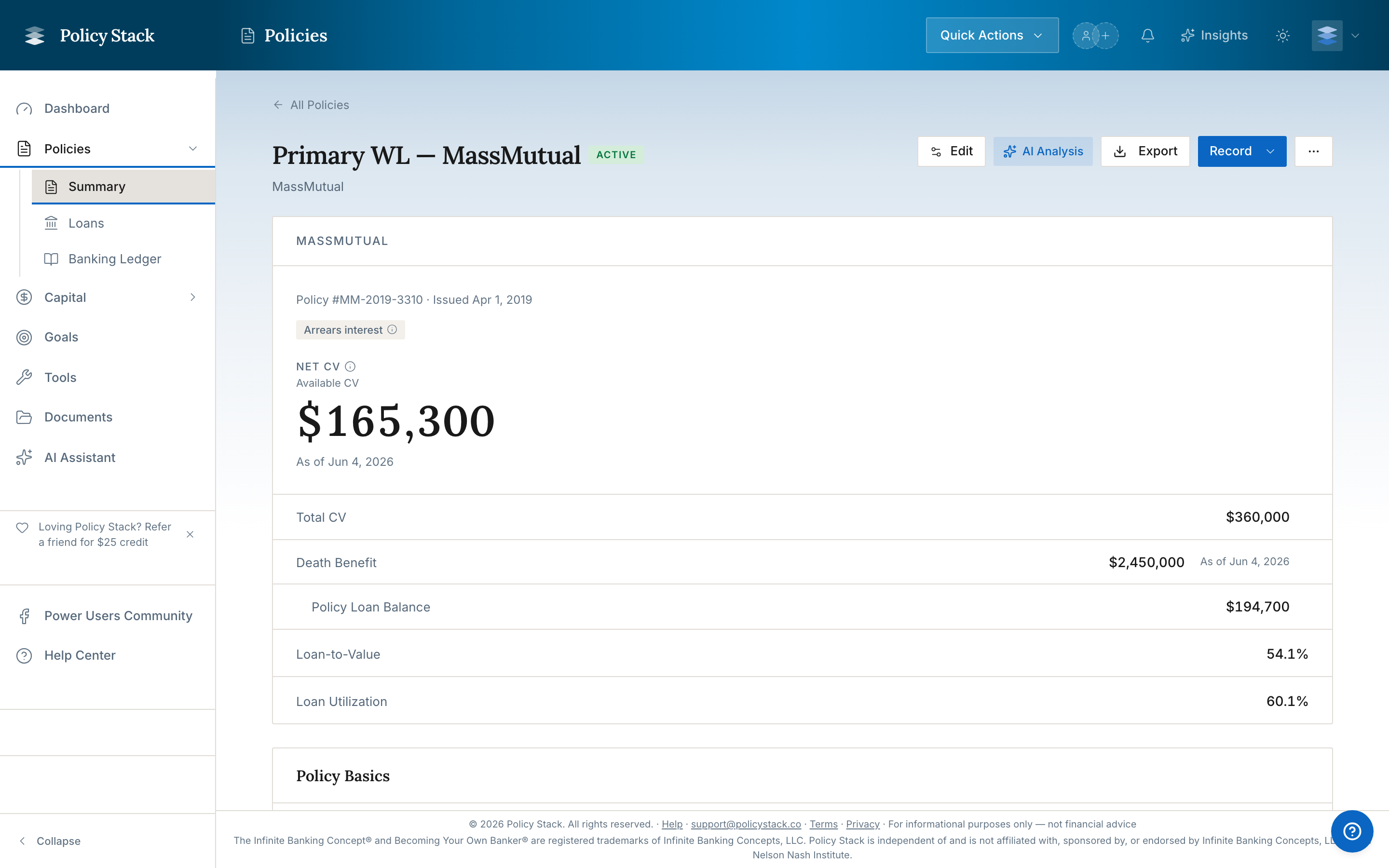
Open a policy from the Policy Portfolio to enter its Policy Workspace. The workspace keeps current position, contract structure, premium activity, capital events, loans, documents, and recorded history separated into six tabs.
Policy Workspace overview
Overview
Overview shows four dashboard-style metric cards in this order: Premiums Paid · 12 Mo, Net Cash Value, Death Benefit, and Loan Balance. Premiums Paid is the policy's recorded Base Premium and PUA payments over the trailing 12 calendar months. Net Cash Value is Total Cash Value less Loan Balance, with both amounts shown below it. Open a card to see that policy's recorded history; opening a card does not start snapshot entry. Premium details may show the change between the first and latest reported PUA cash-value snapshots in the same 12-month window. That change may include growth and is not attributed only to recent purchases. Use Record separately when adding a snapshot.
The editable policy ledger below holds contract facts such as Base and PUA premium, riders, dividend option, loan method, and limited-pay structure. Its premium schedule provides a compact summary without replacing the dedicated Premium Schedule tab.
Premium Schedule
Use Premium Schedule for:
Planned annual Base and PUA amounts
Calendar and schedule details
Recorded premium-payment history
The recorded premium chart and paid/PUA totals for the last 12 calendar months
Base, PUA, and total premiums paid to date
Premium recording preference for Base and optional Planned PUA
Manual Log premium entries
Backfill history for older Base and PUA payments, entered by hand or pre-filled from a carrier statement or transaction history on Builder Pro
The saved policy schedule supplies premium amount, cadence, and dates. The recording preference determines whether Base, optional Planned PUA, both, or neither create pending records for confirmation. Base reminders remain available when recording is off. Policy Stack does not move money or change carrier autopay.
Statement upload fills a review grid first; it does not record a payment until Save history succeeds. Loan repayments, loan-funded activity, and other non-premium transactions are excluded from premium history. Review the extracted rows against the source because the document may cover only part of the policy's history.
Ledger
Ledger is the policy-scoped event history. It brings together recorded snapshots, premium payments, loan draws, loan repayments, dividends, and other policy capital events. Use it when the question is "what was recorded, and when?"
Loans
Loans shows the policy-loan timeline, current and repaid policy loans, draw history, and recorded repayments. Use the loan-specific actions for exact allocations; use the policy-level Log repayment flow when one payment spans multiple active loans.
Documents
Documents holds every file uploaded to this policy — spec pages, riders, annual statements, and other records. Search by filename, filter by document type, and sort by name, date, or size. Multi-file annual statements collapse into a single expandable row by statement date; open it to reach the individual pages.
Analytics
Analytics contains the recorded history behind the workspace:
Policy snapshots and snapshot charts
Annual statements
Cash value and death benefit history
Dividend history
Loan-balance history
Add a snapshot or annual statement here to update the Actual policy position.
Beneficiaries
The Beneficiaries section records the designation shown in the carrier's policy records. Add, edit, or remove entries from the policy workspace. Each entry records:
Beneficiary kind: Person, Trust, Entity (LLC, corporation, or partnership), Estate, or Charity
Name as recorded
Primary or Contingent designation
Optional percentage allocation
Optional email address and phone number, for every kind
For a Person, choose someone from the Family Coverage map to fill Name as recorded, or type a new name. The saved name remains a separate policy record; typing a beneficiary does not add a person to the map.
Policy Stack checks that the recorded percentages for Primary beneficiaries do not exceed 100% and separately checks the Contingent total. These entries document the carrier record; Policy Stack does not submit beneficiary changes to the carrier.
Recorded beneficiary names can appear in Documents → Survivor Guide when Include beneficiaries is enabled and Mask beneficiaries is disabled. The generated guide uses the beneficiary entries recorded on each policy, including each beneficiary's email and phone — separately controlled by the guide's Mask email addresses and Mask phone numbers preferences.
Annual Policy Review
Choose Annual Policy Review from a policy workspace for a connected, read-only view of the policy identity, recorded premium activity, cash-value snapshots, and confirmed illustration rows. Recorded values keep their dates and remain separate from projected or modeled illustration values. Missing history, unreconciled printed components, and unavailable sources stay visible so the record is not filled with zeros. When the staged handoff is enabled, the review can open Debt Payoff Path · Sequencer with the recorded opening values and confirmed illustration capacity stream; Sequencer asks for the loan rate explicitly before transferring the values.
Example Mode Tour
The example-data tour opens an example policy in its seeded Policy Workspace directly after the Banking dashboard, then finishes on Loans. The workspace keeps example records read-only, including the policy and its recorded loan activity, so exploring the tour does not change real policy or loan data. Premium Schedule, Ledger, Analytics, and the rest of the policy workspace remain available outside the three-stop guided sequence.
Header Actions
Record opens Add Snapshot, Add Annual Statement, or Log a premium deposit for this policy
Edit changes policy details
Export provides the available policy reports and data exports
More contains secondary actions such as deletion
On smaller screens, the same core actions remain available in the mobile action bar.
Policy Stack is a tracking and visualization tool. It does not provide financial advice, recommendations, or opinions on what you should do with your banking system.
Policy Stack is independent of and is not affiliated with, sponsored by, or endorsed by Infinite Banking Concepts, LLC or the Nelson Nash Institute.